How to Make GTA 6 Clips for TikTok & Shorts (9:16)
Learn how to make GTA 6 clips for GTA 6 TikTok, YouTube Shorts, and Reels from YouTube streams, Twitch VODs, and Kick highlights—using exact timestamps and 9:16 Vertical Fit so the minimap and wanted stars never get cropped off.
Published · Updated · By VideoClipper
Supported platforms to make GTA 6 clips
Before you learn how to make GTA 6 clips that hold retention on short-form feeds, start with a clean source link. Downloading a four-hour livestream replay just to trim one 35-second chase burns storage and slows you down when a moment is trending. VideoClipper fetches only the timestamp range you select directly in your browser across three major gaming platforms:
| Platform | What works in VideoClipper | Best workflow tip |
|---|---|---|
| YouTube videos & stream replays | Standard youtube.com/watch?v=…, youtu.be/…, and youtube.com/shorts/… links | Replace youtube.com with videoclipper.co in your browser address bar to preload the video and t= timestamp directly. Supports up to 1080p free or 2K/4K with credits when the upload provides it. |
| Twitch clips & public VODs | Public clip links (clips.twitch.tv/…, twitch.tv/channel/clip/…) and public past broadcasts (twitch.tv/videos/…) | Paste a Twitch VOD link with a ?t=1h20m timestamp into the GTA 6 Clip Maker, Twitch VOD Downloader, or Twitch Clip Downloader to cut only your chosen range (1–120s free, or longer with credits). Subscriber-only VODs are not supported. |
| Kick clips | Direct Kick clip links (kick.com/channel/clips/clip_… or kick.com/channel?clip=…) | Full Kick broadcast VOD URLs are not supported yet—create or copy a clip link from the channel’s Clips tab first, then load it in the GTA 6 Clip Maker or Kick Clip Downloader. |
How to make GTA 6 clips step by step (with timestamp examples)
The fastest way to turn raw stream footage into watchable GTA 6 clips for edits, GTA 6 TikTok posts, or YouTube Shorts is a tight four-step pass:
- Open GTA 6 Clip Maker, paste your YouTube, Twitch clip or VOD, or Kick clip URL, and select Load video to verify the preview.
- Set tight Start and End timestamps so the visual or audio hook lands inside 0:00–0:02. Use the
−1sand+1sbuttons to strip out dead air before a crash, heist twist, or punchline. - Keep 9:16 · Vertical selected under Output aspect ratio, choose MP4 (or MP3 for standalone dialogue/reaction audio), and pick 1080p free (or 2K/4K on supported YouTube uploads with one-time credits).
- Sign in, select Create clip, and download your watermark-free file from Clips within 24 hours so you can add captions, sound effects, or commentary in your editor.
Real timestamp examples: how to cut the 0:00–0:02 opening hook
Viewers scroll past GTA 6 TikTok and Shorts uploads inside the first two seconds if the clip opens on menu screens, silent driving, or someone saying "alright guys, watch this." Always trim backwards from the peak moment rather than starting when the mission began:
| Clip type | Raw VOD window vs. tight cut | How to frame 0:00–0:02 |
|---|---|---|
| Police chase & 5-star escape | Skip 1:14:05–1:14:21 cruising; cut 1:14:22 to 1:15:04 (42s) | Start 1 second before the police cruiser clips the rear bumper or the wanted stars jump. Viewers immediately see sirens, speed, and radar dots converging. |
| Heist fail / mission chaos | Skip 08:25–08:40 briefing; cut 08:41 to 09:12 (31s) | Open on the final confident callout right before the getaway vehicle flips or an explosive misfires, and cut 1 second after the squad reaction peaks. |
| Easter egg or map detail | Skip 02:58–03:11 travel; cut 03:12 to 03:38 (26s) | Put the strange NPC interaction or hidden landmark on screen in frames 0:00–0:02 first, then let the player open the map or explain where to find it. |
GTA 6 TikTok, Shorts, and Reels dimensions & clip lengths
Exporting at the right pixel dimensions prevents platform re-compression from turning dark night chases or fine minimap lines into mush. VideoClipper renders true 9:16 vertical canvases across five resolution tiers so your export matches short-form upload specs out of the box:
| Platform | Recommended export | Target clip length | Layout & safe-zone note |
|---|---|---|---|
| GTA 6 TikTok | 1080 × 1920 MP4 (9:16 Fit, 1080p free tier) | 18–45 seconds (up to 60s for full heist arcs) | Keep captions inside the upper/lower padding bands created by 9:16 Fit so TikTok’s right-hand icon rail and bottom description overlay never cover the gameplay. |
| YouTube Shorts | 1080 × 1920 MP4 (or 1440 × 2560 / 2160 × 3840 with credits from 2K/4K YouTube sources) | 15–55 seconds (loopable endings boost average view percentage) | Because YouTube Shorts aggressively compresses fast motion, always export at 1080p or higher when the source supports it. |
| Instagram Reels | 1080 × 1920 MP4 (9:16 Fit, H.264 compatible) | 15–35 seconds (fastest hook-to-payoff window) | Place a bold 4–6 word hook title in the top dark margin so profile grid previews crop cleanly to 3:4 without hiding the car or character. |
Exact VideoClipper 9:16 Fit output canvas dimensions by quality tier: 360p outputs 360 × 640 (16:9 picture centered at ~360 × 202), 720p outputs 720 × 1280 (~720 × 404 gameplay), 1080p outputs 1080 × 1920 (~1080 × 608 gameplay), 2K (1440p) outputs 1440 × 2560, and 4K (2160p) outputs 2160 × 3840. Free accounts can export 1–120 second clips up to 1080p (3 per day, resetting at 16:00 UTC); longer continuous cuts over 2 minutes or 2K/4K exports use one-time credit packs with no recurring subscription.
Why 9:16 Vertical Fit protects the GTA 6 minimap and wanted stars
Open-world gameplay packs essential storytelling into the screen corners—the radar minimap at the bottom-left and wanted stars or health meters at the top-right. When a standard vertical editor auto-crops a 16:9 stream down the middle, viewers lose the police radar dots, miss the wanted-level spike, and cannot tell why a driver suddenly swerved into an alley.
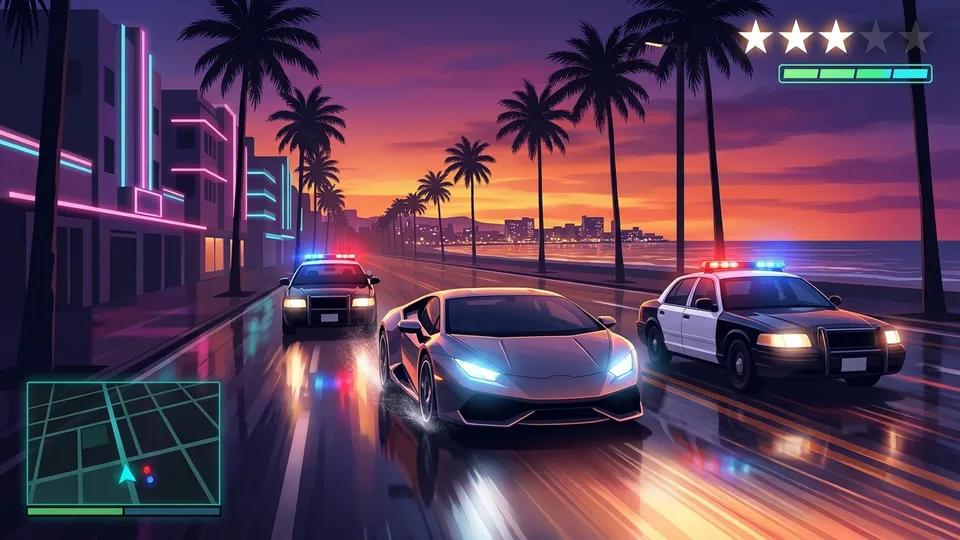
With VideoClipper’s 9:16 Vertical Fit, the complete 16:9 gameplay picture stays untouched in the center while clean dark padding fills the top and bottom margins. That gives you an instant, ready-to-edit vertical canvas where bold headline captions sit above the action and a stacked facecam or subtitles sit below—zero HUD loss and zero manual keyframing. See our 9:16 Fit framing guide for a closer look at how Fit scaling works.
How to avoid in-game radio copyright claims on GTA 6 TikTok & Shorts
Even a perfectly cut GTA 6 clip can get muted, demonetized, or blocked within minutes of upload because of licensed in-game radio stations. TikTok’s automated audio fingerprint system, YouTube Content ID, and Instagram Reels rights matching continuously scan background music—even when the track is playing quietly inside a car while a streamer is talking over it.
- Prefer moments without licensed radio tracks: Before exporting, preview your range and listen for car radio songs in the background. On-foot chases, cutscene reactions, ambient city sound, and voice-chat banter are far safer for GTA 6 TikTok and YouTube Shorts than long highway drives with the radio turned up.
- Trim around song transitions with
−1s/+1snudges: If a character hops into a vehicle and a licensed song starts playing at the end of a stunt, trim the End timestamp 1–2 seconds earlier right before the track becomes recognizable. Cutting out 3 seconds of licensed music beats losing audio on the entire upload. - Use audio extraction for voice-led edits: When you want a clean quote, scream, or reaction sound bite to pair with your own commentary or copyright-safe background beat, export the same range as MP3 or Opus in VideoClipper so you can check the audio waveform and balance levels cleanly in CapCut, Premiere, or DaVinci Resolve.
- Follow creator guidelines and campaign rules: If you are clipping for a streamer or an authorized clipping pool (such as Whop or Content Rewards campaigns), confirm approved channels, attribution tags, and submission rules first. Add real transformative value—tight pacing, accurate subtitles, context headlines, or commentary—to reduce unoriginal-content flags.
VideoClipper is an independent tool not affiliated with or endorsed by Rockstar Games or Take-Two Interactive. Only clip footage you own or have permission to reuse; see our Copyright & DMCA policy.
Posting cadence & batch workflow for GTA 6 TikTok and Shorts
Consistent GTA 6 TikTok and Shorts channels win by turning one long broadcast into a structured batch instead of scrambling to edit one random clip a week:
- Log timestamps while watching: Keep a notepad open during a stream or VOD review and jot down quick markers like
42:18 – 5-star jumpor1:09:40 – heist fail. On YouTube, swapyoutube.comforvideoclipper.coin the URL with&t=to jump straight into the editor at that mark. - Hit the 1–3 hour freshness window for viral events: Major trailer breakdowns, newly discovered Easter eggs, or big streamer moments peak fastest right after they happen. Export your 9:16 Fit MP4 in under a minute and publish the strongest 25–40 second clip first before polishing compilations.
- Match your export cadence to your publishing rhythm: A sustainable rhythm for a growing channel is 1–2 vertical clips per day—for example one high-action chase or fail and one map detail or reaction clip. VideoClipper’s free tier gives you 3 free 1080p clips every day (resetting at 16:00 UTC), which covers daily posting without paying a monthly fee; on launch week or big stream days when you want 10+ exports or 4K clips, top up once with a pay-as-you-go credit pack instead of locking into a subscription.
GTA 6 TikTok & clipping FAQ
What is the best resolution and length for GTA 6 TikTok clips?
Export 1080 × 1920 MP4 using 9:16 · Vertical Fit in the GTA 6 Clip Maker, and aim for 18–45 seconds with the main visual hook inside the first two seconds. That matches TikTok’s native vertical resolution without cropping out the minimap.
Can I make a GTA 6 clip from a multi-hour YouTube or Twitch VOD without downloading the whole stream?
Yes. Paste the YouTube replay URL or public Twitch VOD link (twitch.tv/videos/…, with optional ?t= timestamp) into the GTA 6 Clip Maker, set your exact Start and End range, and VideoClipper exports only that slice—1–120 seconds free or longer continuous segments with one-time credits.
Why do my GTA 6 TikTok clips sometimes get muted after uploading?
In-game licensed radio music is the most common cause of automatic muting on TikTok, YouTube Shorts, and Reels. Stick to moments with streamer commentary, dialogue, or ambient gameplay sound, and trim out car-radio segments with −1s / +1s nudges before exporting.
How do I cross-post the same GTA 6 clip to TikTok, Shorts, and Reels without watermarks?
Download your clean 1080 × 1920 MP4 directly from VideoClipper’s Clips tab (zero watermarks, available for 24 hours), finish your captions in your editor, and upload that master file separately to TikTok, YouTube Shorts, and Instagram Reels instead of re-downloading a watermarked TikTok file.