Reliable, Ad-Free Alternative to YTCutter for YouTube Clips
Looking for a clean YTCutter alternative that stays online without pop-up ads or fake download buttons? VideoClipper trims exact YouTube timestamp segments to MP4, WebM, or MP3 in 16:9 or 9:16—free daily up to 1080p.
Open YouTube Video Trimmer View pay-as-you-go packs
VideoClipper vs. classic YTCutter-style web trimmers
Classic YouTube cutter sites like YTCutter became popular because nobody wants to download a 90-minute video just to keep 25 seconds. Over time, many legacy cutter domains went offline, capped exports at blurry 360p/720p, or were replaced by clone domains filled with redirect ads.
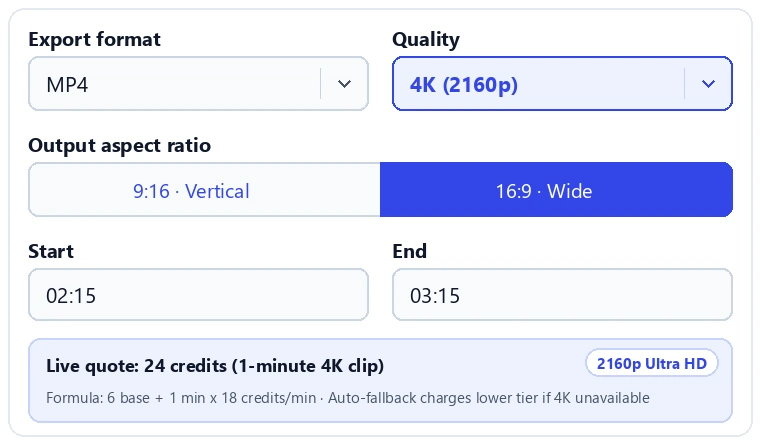
VideoClipper preserves the fast paste-and-cut simplicity YTCutter users loved, while upgrading output reliability to 1080p free daily and 2K/4K via transparent one-time credits instead of ad networks.
| Feature | VideoClipper | Typical YTCutter clones |
|---|---|---|
| Pop-up ads & redirect traps | Zero ads, zero redirects | Frequently ad-supported or domain-rotated |
| Timestamp accuracy | Visual preview, timeline handles, and 1-second nudges | Manual start/end inputs; preview varies by mirror |
| Video & audio formats | MP4, WebM, MP3, M4A, OGG, Opus | Usually basic MP4 or MP3 only |
| 9:16 vertical Fit framing | Built-in Fit padding (keeps full 16:9 picture) | Not supported |
| Resolution ceiling | Up to 1080p free; 2K (1440p) & 4K (2160p) with one-time credits | Often capped at 360p–720p |
| Extra platforms | Also supports Twitch clips, public Twitch VODs, and Kick clips | YouTube only |
Which tool fits your workflow better?
Stick with YTCutter when
- You only need an anonymous one-off 360p test cut and do not mind searching for whichever mirror domain is currently online.
- You never need vertical 9:16 framing, audio formats beyond basic MP3, or resolutions above 720p.
Switch to VideoClipper when
- You want a dependable, ad-free workspace that never hijacks your browser tab with pop-under redirects or misleading download buttons.
- You need crisp 1080p (free) or 2K/4K exports, 9:16 vertical framing for Shorts/Reels, or clean exports from Twitch VODs and Kick clips too.
Need platform-specific tools? Jump straight to our Twitch VOD Downloader, Twitch Clip Downloader, Kick Clip Downloader, or GTA 6 Clip Maker.
Why legacy YTCutter domains break or throttle quality
Server-side video trimming requires real cloud bandwidth and FFmpeg compute. Legacy ad-supported cutters try to cover those server bills with aggressive pop-under scripts, fake "Download Now" banners, or silent downgrades to 360p/480p.
VideoClipper funds reliable extraction sustainably: every signed-in account receives 3 free 1–120 second exports per day up to 1080p, while heavy users fund infrastructure through optional one-time credit packs starting at $4.99—meaning zero ad networks and zero dark patterns.
Upgrading your trim workflow: timeline preview, 1s nudges, and 24-hour Clips
If you used YTCutter’s text boxes to type start and end times, VideoClipper feels immediately familiar while eliminating trial-and-error downloads:
- Preview before exporting: Scrub the embedded player or drag the Start/End handles and tap −1s / +1s nudges so you verify exact dialogue boundaries before spending a daily export.
- Automatic 24-hour clip library: Finished exports stay stored privately in your Clips tab for 24 hours so you can re-download on mobile or copy a revocable share link instead of losing the file if a browser tab closes.
- True 2K/4K with fallback protection: When a YouTube source provides native 1440p or 2160p streams, VideoClipper lets you export at full sharpness and automatically charges only the delivered tier if an upstream source falls back.
Frequently asked questions
How is VideoClipper different from legacy YTCutter websites?
VideoClipper runs on a clean, ad-free workspace with no pop-under redirects or watermarks. Beyond basic YouTube MP4/MP3 trimming, it supports 9:16 Vertical Fit framing, 2K/4K exports via one-time credits, a 24-hour clip library, and Twitch/Kick clip downloads.
Do I have to download the entire YouTube video before trimming?
No. Paste the YouTube watch, youtu.be, or Shorts link, pick exact Start and End timestamps, and VideoClipper exports only the selected clip.
Can I extract just MP3 audio from a YouTube timestamp range?
Yes. Select MP3, M4A, OGG, or Opus under Export format when the source has an exportable audio track.
Is there a recurring subscription to export longer or 4K clips?
No subscription. Every signed-in account gets up to 3 free 1–120 second exports per day up to 1080p. Optional one-time credit packs start at $4.99 for longer segments or 2K/4K output.