Clean, Ad-Free Alternative to Cobalt.tools for YouTube Clips
When cobalt.tools disables YouTube or you only need a specific timestamp range, VideoClipper lets you cut and export clean MP4, WebM, or MP3 clips directly in your browser—with zero pop-up ads and no subscription.
Open YouTube Clipper View pay-as-you-go packs
Honest comparison: VideoClipper vs. cobalt.tools vs. yt-dlp
People love cobalt.tools because it respects your time and never throws pop-up ads or fake download buttons at you. VideoClipper shares that exact ad-free standard, but solves a different job: server-side timestamp slicing for YouTube, Twitch, and Kick rather than full-file multi-network downloading.
Instead of downloading an entire 2-hour video and opening a separate desktop editor just to save 25 seconds, VideoClipper trims the exact range in your browser and outputs a ready-to-post 16:9 or 9:16 file.
| Feature | VideoClipper | cobalt.tools | yt-dlp (CLI) |
|---|---|---|---|
| Pop-up ads & watermarks | None | None | None |
| Exact timestamp trimming | Built-in visual preview, Start/End inputs, 1s nudge | Not built in (downloads full media) | Supported via CLI flags (--download-sections) |
| Output formats | MP4, WebM, MP3, M4A, OGG, Opus | MP4, MP3, OGG, WAV, Opus | Any container via FFmpeg |
| 9:16 vertical Fit framing | Built-in (no cropping, pads cleanly) | Not supported | Manual FFmpeg filter required |
| Mobile browser ready | Yes (iOS Safari & Android Chrome) | Yes (when YouTube is enabled) | Desktop / Termux setup required |
| Pricing & sustainability | 3 free 1080p clips/day; one-time credit packs from $4.99 (no subscription) | Free / donation-supported | Free / open source |
Which tool fits your workflow better?
Stick with cobalt.tools when
- You need full-length downloads from TikTok, Instagram, X/Twitter, Reddit, or Bluesky—cobalt.tools and community instances cover far more social networks.
- You already live in the terminal and want scripted batch downloads with custom FFmpeg flags—open-source yt-dlp remains unbeatable for automation.
Switch to VideoClipper when
- YouTube is temporarily disabled on cobalt.tools or you only want a specific 15–120 second moment instead of waiting for a full 90-minute download.
- You want visual timeline scrubbing, 9:16 Vertical Fit padding for Shorts/TikTok, or a fast browser workflow on iPhone Safari and Android Chrome.
Need platform-specific tools? Jump straight to our Twitch VOD Downloader, Twitch Clip Downloader, Kick Clip Downloader, or GTA 6 Clip Maker.
3-step switch when cobalt.tools disables YouTube
Because YouTube aggressively rotates anti-bot checks, donation-funded downloaders periodically disable YouTube support without warning. Switching your timestamp workflow to VideoClipper takes under ten seconds and requires zero software setup:
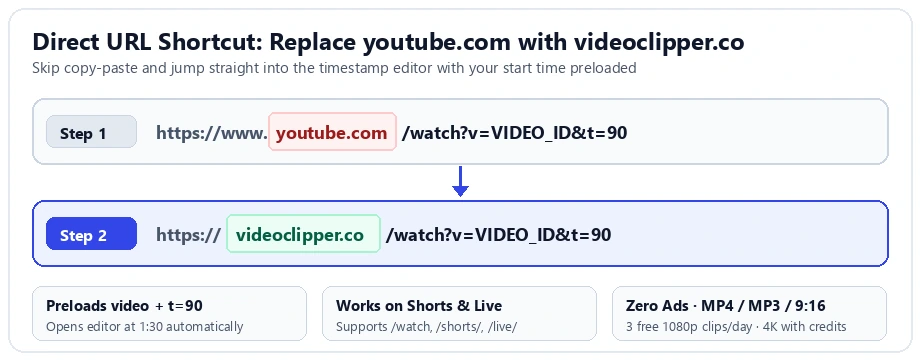
- Use the domain shortcut from YouTube: Change youtube.com to videoclipper.co directly in your address bar (for example videoclipper.co/watch?v=VIDEO_ID&t=90). The editor opens with the video and start time pre-filled.
- Slice before you download: Enter exact Start and End times (or nudge by ±1 second) instead of downloading a 1.5 GB full stream and trimming locally in Premiere or CapCut.
- Pick MP4 or standalone audio: Free signed-in accounts include 3 daily 1–120s exports up to 1080p (or MP3/M4A/OGG/Opus); optional one-time credit packs starting at $4.99 cover 2K/4K and multi-minute cuts.
Browser slicing vs. running yt-dlp --download-sections locally
Power users often compare VideoClipper with running yt-dlp --download-sections "*00:42-01:02" plus FFmpeg on their own machine. Local CLI tooling is free and flexible, yet maintaining yt-dlp updates, PO tokens, cookies, and manual FFmpeg 9:16 pad filters breaks quickly on mobile or shared work laptops.
VideoClipper offloads extraction and FFmpeg scaling to managed servers so you get consistent H.264 MP4 or MP3 output from any browser—with revocable 24-hour download links and zero local dependencies.
Frequently asked questions
Why does VideoClipper focus on YouTube clips instead of full multi-platform downloads?
VideoClipper is built specifically for cutting exact timestamp segments from YouTube videos and Shorts (plus Twitch and Kick clips) without downloading the entire source file first. If you need full videos from X, TikTok, or Instagram, open-source tools like yt-dlp or community Cobalt instances remain better fits.
Does VideoClipper show pop-up ads or add watermarks?
No. VideoClipper has zero pop-up ads, zero redirect traps, and adds no watermark to exported MP4, WebM, or audio files.
How much is free, and do I need a subscription?
Previewing a video and setting timestamps is free as a guest. Signing in gives you up to 3 free 1–120 second exports per day (up to 1080p video or audio, resetting at 16:00 UTC). Longer clips and 2K/4K exports use one-time pay-as-you-go credit packs starting at $4.99 with no recurring subscription.
Can I open a YouTube video directly by replacing the domain?
Yes. Replace youtube.com with videoclipper.co in any standard watch or Shorts URL—for example videoclipper.co/watch?v=VIDEO_ID&t=90—to jump straight into the editor with the video and start timestamp preloaded.