VideoClipper vs Zclipper: Clean YouTube & Stream Clipper
Comparing Zclipper and VideoClipper for cutting YouTube clips online? See how VideoClipper stacks up on ad-free reliability, audio formats (MP3/M4A/OGG/Opus), 9:16 vertical framing, 24-hour share links, and Twitch/Kick clip downloads.
Open YouTube Clipper View pay-as-you-go packs
Honest comparison: VideoClipper vs. Zclipper
Zclipper appeals to users looking for a simple browser-based way to grab an MP4 or WebM slice from a YouTube URL without installing desktop software.
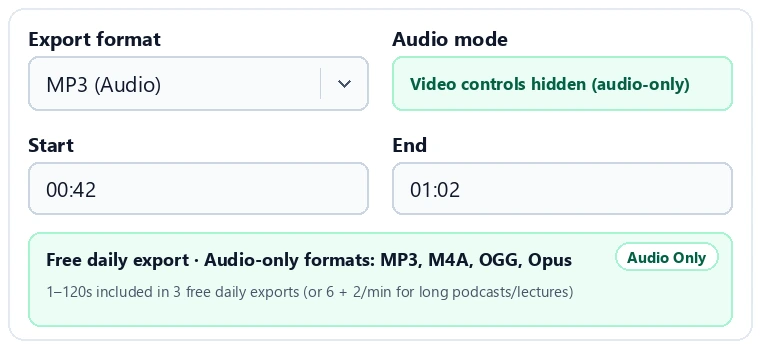
VideoClipper extends that clean, no-install workflow with four capabilities audio editors and short-form teams frequently miss: multi-format audio extraction (MP3, M4A, OGG, Opus), 9:16 Vertical Fit framing, private 24-hour shareable clip history, and built-in Twitch/Kick support.
| Feature | VideoClipper | Zclipper |
|---|---|---|
| Video & audio formats | MP4, WebM, MP3, M4A, OGG, Opus | MP4 / WebM focus |
| 9:16 vertical output | Built-in Fit framing (preserves full 16:9 image) | Original aspect ratio |
| Clip history & sharing | 24-hour clip library with revocable result links | Direct single-download workflow |
| Multi-platform support | YouTube, YouTube Shorts, Twitch clips, public Twitch VODs, Kick clips | YouTube |
| High-res & long clips | Up to 1080p free daily; 2K/4K & long clips via one-time credits | Standard browser clip limits |
| Quick launch shortcut | Replace youtube.com with videoclipper.co | Copy & paste URL |
Which tool fits your workflow better?
Stick with Zclipper when
- You only want a quick one-off MP4/WebM YouTube snippet in its original aspect ratio and do not need audio-only formats or clip sharing.
Switch to VideoClipper when
- You extract podcast quotes, voice samples, or music cues as MP3, M4A, OGG, or Opus alongside your video clips.
- You edit on iOS Safari or Android Chrome, collaborate with teammates via revocable 24-hour share links, or clip Twitch and Kick streams too.
Need platform-specific tools? Jump straight to our Twitch VOD Downloader, Twitch Clip Downloader, Kick Clip Downloader, or GTA 6 Clip Maker.
Beyond raw MP4/WebM: standalone audio & vertical repurposing
If your workflow involves cutting podcast excerpts, reaction sound bites, or lecture quotes, downloading an MP4 and running it through a second MP3 converter wastes time and degrades audio quality.
VideoClipper exports directly to MP3, M4A (AAC), OGG, or Opus from your selected timestamp range—and long audio segments over 2 minutes cost just 2 credits per minute after the 6-credit base. When you do need video for TikTok or Shorts, toggling 9:16 Vertical Fit wraps your widescreen clip into a clean 1080 × 1920 file automatically.
Mobile browser editing & revocable 24-hour share links
Single-shot download pages lose your output the moment a mobile browser refreshes or a download gets interrupted. VideoClipper keeps every completed clip in your private Clips tab for 24 hours:
- Reliable mobile downloads: Save MP4 or MP3 files directly on iPhone Safari or Android Chrome without fighting pop-ups or broken blob downloads.
- Share for quick review: Copy a result link to send a rough clip to a teammate or client without uploading to Drive or Dropbox first.
- Instant access revocation: Deleting any clip from your Clips library immediately disables its download and share links and schedules private R2 deletion.
Frequently asked questions
What makes VideoClipper a strong Zclipper alternative?
VideoClipper gives you an ad-free, watermark-free workflow plus four extras many lightweight clippers omit: dedicated audio exports (MP3, M4A, OGG, Opus), 9:16 Vertical Fit framing, Twitch and Kick clip downloaders, and one-time credit packs for 2K/4K or long segments.
Can I share a finished clip before downloading it?
Yes. Every finished export stays in your Clips tab for 24 hours, and you can copy a shareable result link or delete the clip anytime to immediately disable access.
Does VideoClipper work on iPhone Safari and Android Chrome?
Yes. The entire workspace—timestamp entry, 1-second nudges, format selection, and download—runs directly in mobile browsers with no app install.
Are there watermarks or monthly subscriptions?
Never. VideoClipper adds no watermarks and offers 3 free 1–120 second exports per day up to 1080p after sign-in, with optional one-time credit packs starting at $4.99.