Cut long YouTube video clips over 2 minutes
Cut continuous segments longer than 2 minutes from a YouTube video directly in your browser—without downloading the full multi-gigabyte file first.
Published · Updated · By VideoClipper
Free 2-minute limit vs. continuous long-clip credits
Free signed-in accounts can export up to three standard clips per day covering 1–120 seconds (up to 1080p video or audio). Whenever you need an unbroken lecture chapter, full podcast segment, webinar Q&A, or boss fight longer than 120 seconds, VideoClipper automatically switches to a transparent pay-as-you-go credit quote that scales linearly by minute—within the verified duration of the source video:
| Example long selection | Format & quality | Credit formula | Estimated credits |
|---|---|---|---|
| 3-minute tutorial chapter | 1080p MP4 | 6 + 3 × 7 | 27 credits |
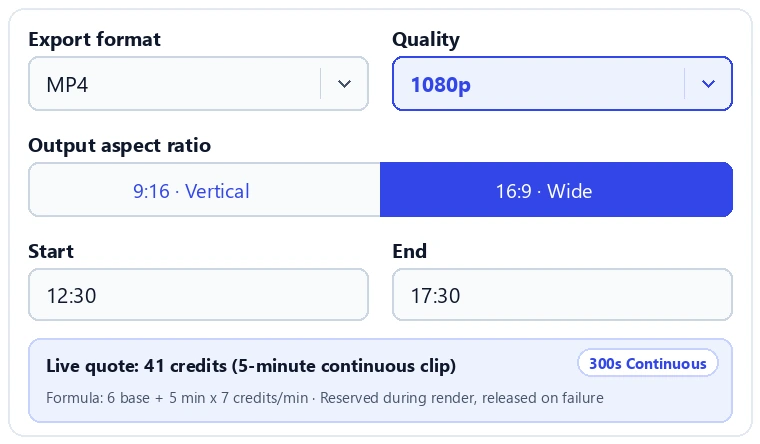
| 5-minute stream highlight | 1080p MP4 | 6 + 5 × 7 | 41 credits |
| 10-minute webinar Q&A | 720p MP4 | 6 + 10 × 5 | 56 credits |
| 20-minute talk or class | 720p MP4 | 6 + 20 × 5 | 106 credits |
| 10-minute podcast excerpt | MP3 / M4A audio | 6 + 10 × 2 | 26 credits |
| 30-minute interview audio | MP3 / Opus audio | 6 + 30 × 2 | 66 credits |
One-time credit packs start at $4.99 for 500 credits (valid 90 days) with no subscription. Compare packs on the Pricing page. Only removing a short intro or outro under 2 minutes? Use our YouTube Video Trimmer for free daily exports.
How to export a continuous clip over 2 minutes
- Paste an individual YouTube link (or public Twitch VOD link via our Twitch VOD Downloader) that you own or have permission to clip, then select Load video.
- In Controls, enter exact Start and End timestamps using
mm:ss(e.g.,12:30to17:30) orhh:mm:ss(e.g.,1:05:00to1:15:00) for multi-hour broadcasts. - Choose your Export format, Quality, and Output aspect ratio. Check the live credit total shown right below the controls before submitting.
- Select Create clip. Long segments run asynchronously in the cloud so you do not need to keep your laptop awake encoding—once ready, download the finished file from Clips within 24 hours.
Practical tips to cut cost and wait time on long videos
- Drop to 720p for talking heads and lectures: Moving from 1080p (7 credits/min) to 720p (5 credits/min) cuts per-minute credit usage by nearly 30%, renders faster, and keeps file sizes practical for mobile downloads.
- Export audio-only when visuals do not matter: Podcasts, panels, and music breakdowns cost only 2 credits/min after the 6-credit base—a 30-minute MP3 excerpt costs just 66 credits.
- Trim dead air across chapter boundaries: Because partial minutes round up, trimming a 5:04 selection down to 4:58 saves a full minute’s credit rate and produces a tighter edit.
- Split multi-hour streams by topic instead of exporting blindly: Extracting three focused 6-minute segments is faster to render, easier to store, and simpler to edit than wrestling with a single 90-minute file.
Long YouTube clip FAQ
What happens to my credits if a long render fails or gets cancelled?
Credits are only reserved while the job processes and are settled only after the finished file passes verification and is ready in Clips. If a job fails or is cancelled, the full reservation is automatically released back to your balance.
Can I cut a 10-minute section from a 4-hour YouTube livestream replay?
Yes. Enter hh:mm:ss timestamps (for example 2:14:00 to 2:24:00) and VideoClipper fetches and renders only that 10-minute window rather than forcing you to download the full 4-hour broadcast.
Do I have to stay on the page while a long clip finishes rendering?
No. Once submitted, rendering happens server-side. You can close the tab or come back later and open Clips to check progress and download the finished file within 24 hours of completion.
Can I combine long duration with 2K or 4K resolution?
Yes, when the source provides a verified 1440p or 2160p stream and the estimated output fits within the supported render ceiling. Check our 2K & 4K export guide for exact high-res rates.