Clip YouTube Shorts and make 9:16 vertical clips
Trim an exact moment from a YouTube Short, or turn a widescreen YouTube highlight into a 9:16 vertical clip without cropping off either side.
Published · Updated · By VideoClipper
Two YouTube Shorts clipping workflows
Whether you are trimming a 12-second punchline out of an existing vertical Short or turning a horizontal interview or stream highlight into a Shorts-ready vertical clip, VideoClipper handles both in the same ad-free browser editor:
| Source type | URL format | Recommended export setting |
|---|---|---|
| Existing YouTube Short | youtube.com/shorts/VIDEO_ID | Paste the Short URL (or swap youtube.com for videoclipper.co), trim exact Start/End times, and export as 9:16 · Vertical MP4 or extract audio as MP3. |
| Landscape YouTube video (16:9) | youtube.com/watch?v=VIDEO_ID | Choose 9:16 · Vertical at 1080p. VideoClipper uses Fit framing so slides, captions, HUDs, or dual speakers stay fully visible with clean dark padding above and below. |
Step-by-step: cut a YouTube Short cleanly
- Open the individual Short or video on YouTube and copy its link (if you are browsing a channel Shorts tab, tap into the specific Short first). Alternatively, replace
youtube.comwithvideoclipper.codirectly in your browser address bar. - Open the YouTube Video Clipper, paste the URL, and select Load video to verify the preview and duration.
- Enter tight Start and End timestamps in Controls. Use the
−1sand+1sbuttons to remove dead air before the opening line or trim awkward silence at the tail. - Choose MP4 (or MP3 / Opus if you only need a voice quote or sound effect), set Output aspect ratio to 9:16 · Vertical, pick 1080p, sign in, and select Create clip.
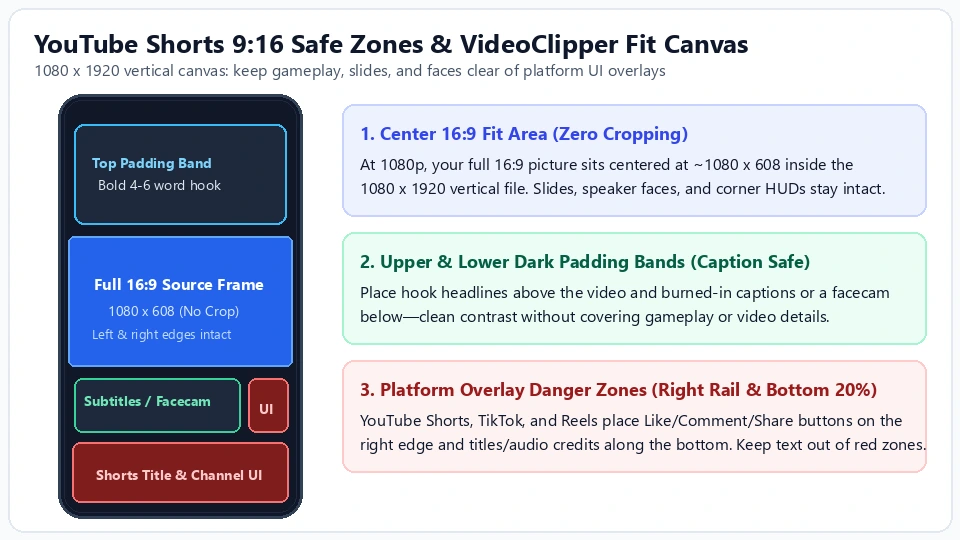
Want exact pixel dimensions for 360p through 4K vertical canvases? Read our 9:16 Fit framing guide.
Pacing, looping, and safe-zone tips for higher Shorts retention
- Land the hook inside 0:00–0:02: Trim backwards from the payoff instead of keeping an intro greeting. Starting directly on motion, a bold claim, or a reaction noticeably lowers swipe-away rate.
- Aim for 15–45 seconds (under the 60s sweet spot): Even though YouTube Shorts supports longer vertical clips, tight single-idea cuts between 15 and 45 seconds consistently earn higher average view percentage and replays.
- Build a seamless loop ending: Trim the End timestamp right after the final syllable instead of leaving 1.5 seconds of fade-out so the Short loops straight back into the opening line.
- Keep text out of the bottom 20% and right edge: YouTube Shorts overlays channel names, captions, and Like/Comment/Share buttons along the bottom and right margin. Use the upper dark band created by 9:16 Fit for your hook headline so nothing collides with platform UI.
Clipping gaming streams for Shorts and TikTok? Our GTA 6 Clip Maker and GTA 6 Shorts & TikTok workflow guide show how to keep corner minimaps intact.
Free daily allowance, mobile workflow, and audio extraction
VideoClipper works directly in desktop browsers, iPhone Safari, and Android Chrome with zero app installation and zero watermarks. Free signed-in accounts include up to 3 standard 1–120 second exports per day (up to 1080p video or audio, resetting daily at 16:00 UTC). Finished clips stay available in Clips for 24 hours so you can download them to your camera roll or copy a revocable share link.
Only want the speech or sound bite from a Short? Switch Export format to MP3 or Opus—see our YouTube MP3 audio guide for format comparisons.
YouTube Shorts clipping FAQ
Can I paste a youtube.com/shorts/... link directly without converting it to a watch URL?
Yes. VideoClipper natively accepts youtube.com/shorts/VIDEO_ID links as well as standard watch?v= and youtu.be/ links. You can also replace youtube.com with videoclipper.co in any Shorts URL to open the editor immediately.
Will VideoClipper add a watermark to my exported YouTube Short?
Never. Every MP4, WebM, and audio file exported from VideoClipper is completely watermark-free on both the free daily tier and paid credit packs.
Why is my exported Short slightly longer than the exact Start and End seconds I typed?
Video compression groups frames around keyframes. When cutting without degrading visual quality, the exported segment can include a fraction of a second of keyframe boundary padding. Always play back the start and end before publishing and nudge by 1 second if needed.
Can I clip a YouTube Short on my iPhone or Android phone?
Yes. Open VideoClipper in Safari on iOS or Chrome on Android, paste the Shorts link, set your timestamps, and download the finished 1080 × 1920 MP4 directly to your Files or Downloads folder.