Export 2K and 4K YouTube clips with credits
Export sharp 2K (1440p) or 4K (2160p) segments from YouTube videos using one-time credits—with no recurring subscription.
Published · Updated · By VideoClipper
Free 1080p vs. 2K and 4K credit rates
Most browser clippers cap video quality at 720p or 1080p—or lock 4K behind a recurring monthly plan. VideoClipper lets you stay on the free daily tier for 1080p (3 clips per day, 1–120s) and spend one-time pay-as-you-go credits only when a project genuinely requires 1440p or 2160p detail:
| Resolution | Canvas (16:9 / 9:16) | Credit formula | 1-min / 3-min clip |
|---|---|---|---|
| 1080p Full HD | 1920×1080 / 1080×1920 | Free (1–120s, 3/day) or 6 + 7/min | 13 / 27 credits (when paid) |
| 2K (1440p) | 2560×1440 / 1440×2560 | 6 + 12/min | 18 / 42 credits |
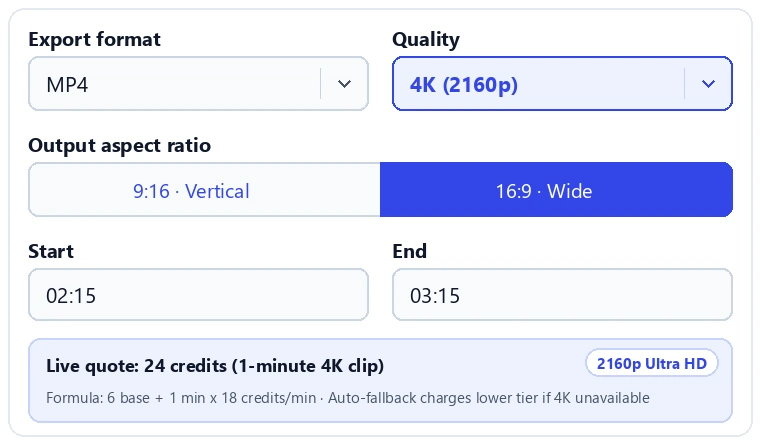
| 4K (2160p) | 3840×2160 / 2160×3840 | 6 + 18/min | 24 / 60 credits |
Partial minutes round up, and the editor always displays your exact credit quote before you submit. A single $4.99 Light Pack (500 credits) covers roughly 20 one-minute 4K clips or 27 one-minute 2K clips, valid for 90 days with zero auto-renewal. See Pricing and Credits for full pack comparisons.
How to export a 2K or 4K clip step by step
- Open the YouTube Video Clipper, paste a YouTube video link you own or have permission to clip, and select Load video.
- Enter exact Start and End timestamps in Controls (use the
−1s/+1sbuttons to tighten the range so you only pay for the minutes you need). - Pick MP4 or WebM under Export format, then open Quality and choose 2K (1440p) or 4K (2160p) when available for that source.
- Review the live credit quote below the controls, sign in, and select Create clip. Download the rendered file from Clips within 24 hours.
MP4 vs. WebM for 2K and 4K editing workflows
YouTube delivers most 1440p and 2160p streams upstream in high-efficiency VP9/WebM, which VideoClipper transcodes cleanly into your chosen container:
| Container | Best for | Trade-off |
|---|---|---|
| MP4 (Recommended) | Premiere Pro, Final Cut Pro, DaVinci Resolve, CapCut, iPhone Photos, and direct social re-uploads | Slightly larger files than WebM, but opens natively everywhere with zero conversion step |
| WebM | Web publishing, Chrome/Firefox playback, and smaller 4K archives | Not supported natively by Apple QuickTime or older iOS editors without re-wrapping |
Source availability checks & automatic credit protection
Not every YouTube video has a true 1440p or 2160p stream available—even if the title says "4K". VideoClipper verifies high-resolution availability before rendering and protects your credit balance at two stages:
- Automatic tier fallback & price adjustment: If you request 4K (2160p) and the upstream source only delivers 2K (1440p) or 1080p during rendering, VideoClipper automatically falls back to the highest deliverable tier and settles only the lower tier’s credit cost, releasing the reserved difference back to your balance immediately.
- Zero charge on failed or cancelled renders: Credits are only reserved while a task runs. If an upstream source fails, times out, or exceeds the delivery limit, every reserved credit is returned automatically.
- Why freshly uploaded videos may lack 4K temporarily: YouTube encodes SD and 1080p streams first and can take 15–60 minutes (or longer for multi-hour streams) to finish publishing 2K/4K renditions. Reload the link later if a brand-new upload only shows 1080p.
Need a continuous 4K segment longer than 2 minutes? See our long YouTube clip guide for tips on estimating credits and speeding up multi-minute exports.
2K & 4K YouTube clip FAQ
Why is 4K (2160p) grayed out or falling back to 1080p on my video?
VideoClipper never upscales a lower-resolution video and labels it 4K. High-resolution tiers require a true 1440p or 2160p stream on YouTube. Older uploads, most Shorts, and livestreams that finished minutes ago often cap at 1080p.
How much does a 45-second 4K clip cost in credits?
Partial minutes round up to the nearest minute, so any 1–60 second 4K clip costs 24 credits (6 base + 1 × 18). A 61–120 second 4K clip counts as 2 minutes (42 credits).
Can I export a 4K clip in 9:16 Vertical Fit format?
Yes. Selecting 4K (2160p) with 9:16 · Vertical outputs a crisp 2160 × 3840 vertical canvas with your full 16:9 picture centered intact—at the exact same credit rate as 16:9 Wide.
Do my unused credits expire quickly if I only export 4K clips occasionally?
No subscriptions and no monthly resets. Light Pack credits remain valid for 90 days and Standard Pack credits remain valid for 180 days from purchase.