VideoClipper vs ClipSaw: Ad-Free Timestamp YouTube Clipper
Both ClipSaw and VideoClipper focus on cutting specific YouTube segments directly in your browser. Here is how they compare when you need 9:16 vertical framing, multi-format audio, Twitch/Kick clips, or pay-as-you-go 4K exports.
Open YouTube Clipper View pay-as-you-go packs
When to pick VideoClipper vs. ClipSaw
ClipSaw is a lightweight browser utility built for straightforward YouTube start-and-end trimming into MP4 or audio files. If all you need is a quick, single-platform YouTube cut in the original aspect ratio and ClipSaw is working for your source, it gets the job done.
VideoClipper is built for short-form creators, gaming clippers, and editors who need one consistent tool across YouTube, Twitch VODs, and Kick—with built-in 9:16 Vertical Fit framing and transparent pay-as-you-go scaling for long or 4K cuts.
| Feature | VideoClipper | ClipSaw |
|---|---|---|
| Core workflow | Paste URL or replace youtube.com with videoclipper.co | Paste YouTube URL and mark start/end on timeline |
| Supported platforms | YouTube (watch & Shorts), Twitch clips, public Twitch VODs, Kick clips | YouTube |
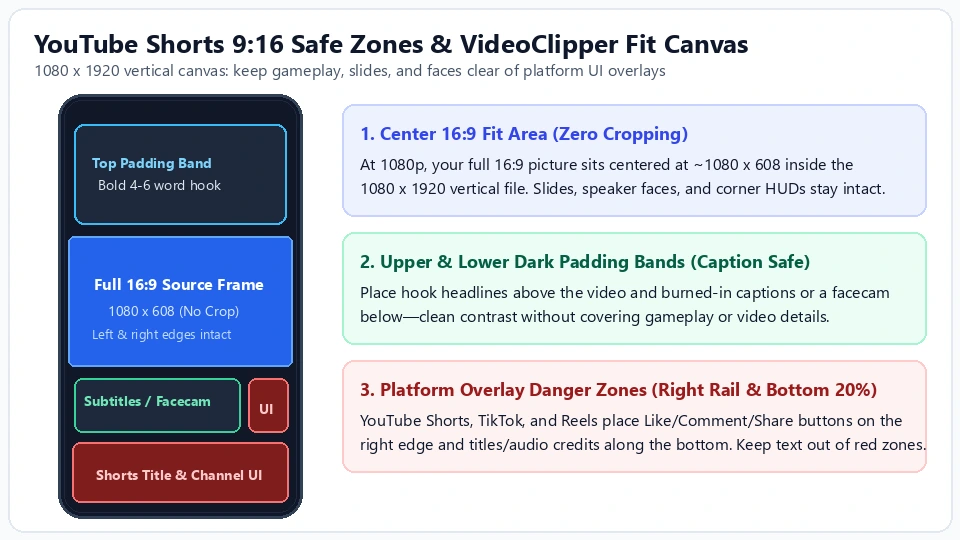
| 9:16 vertical Fit framing | Built-in (no cropping, pads cleanly above/below) | Standard source aspect ratio |
| Audio output options | MP3, M4A, OGG, Opus | MP3 / M4A (varies by source) |
| Long clips & 2K/4K exports | Transparent one-time credit packs from $4.99 (no subscription) | Standard web length/quality caps |
| Ads & watermarks | Zero pop-up ads and zero watermarks | Lightweight web utility; no heavy editor clutter |
Which tool fits your workflow better?
Stick with ClipSaw when
- You only cut occasional short YouTube clips in native 16:9 and do not need vertical 9:16 conversion, 4K resolution, or Twitch/Kick support.
- You prefer not to create a free account even for saving a 24-hour clip history.
Switch to VideoClipper when
- You repurpose horizontal YouTube, Twitch, or Kick highlights into YouTube Shorts, TikTok, or Reels and want instant 9:16 Fit framing with zero HUD loss.
- You periodically need continuous clips longer than 2 minutes or 2K/4K exports with predictable per-minute pricing and no monthly subscription.
Need platform-specific tools? Jump straight to our Twitch VOD Downloader, Twitch Clip Downloader, Kick Clip Downloader, or GTA 6 Clip Maker.
One workspace for YouTube, Twitch VODs, and Kick highlights
Modern gaming and commentary channels rarely pull footage from YouTube alone. A single daily posting batch often combines a YouTube podcast segment, a 30-second Twitch VOD fight, and a Kick stream reaction.
Rather than juggling three different ad-heavy downloaders, VideoClipper brings YouTube videos/Shorts, Twitch clips and multi-hour public Twitch VODs, and Kick clips under the exact same timestamp controls, 9:16 Fit engine, and 24-hour Clips library.
Transparent scaling beyond 2-minute and 1080p web limits
Many browser trimmers silently cap clip length or fail on multi-hour VODs. VideoClipper separates everyday free use from heavy cloud rendering clearly:
- Predictable daily free tier: Up to 3 standard 1–120 second clips per day up to 1080p video or audio, resetting daily at 16:00 UTC.
- Linear per-minute credit quotes: For clips over 2 minutes or 2K/4K video, you see the exact credit quote (6 base + per-minute tier rate) before submitting—with automatic release if a task fails.
- No subscription lock-in: Buy a $4.99 Light Pack (500 credits, 90 days) or $9.99 Standard Pack (1,100 credits, 180 days) only when launch weeks or big streams demand extra volume.
Frequently asked questions
When should I choose VideoClipper over ClipSaw?
Choose VideoClipper when you want zero ads, 9:16 Vertical Fit framing without cropping widescreen footage, clips longer than 2 minutes or in 2K/4K without a monthly subscription, or a single tool that also handles Twitch and Kick clips.
Does VideoClipper require an account to try the editor?
You can load any supported link, scrub the preview, and dial in exact Start and End timestamps as a guest. Signing in unlocks up to 3 free daily exports up to 1080p and saves your finished files in Clips for 24 hours.
Can VideoClipper keep the whole widescreen frame in a 9:16 clip?
Yes. Selecting 9:16 Vertical uses Fit framing, keeping the complete horizontal picture visible and adding clean dark padding above and below instead of slicing off the edges.
How does the videoclipper.co URL shortcut work?
Replace youtube.com with videoclipper.co in any standard watch or Shorts link in your address bar. VideoClipper opens straight into the editor with the video and t= timestamp already loaded.